Rokae xMate ROS 2 User Manual
| Item | Description |
|---|---|
| Document Name | Rokae xMate ROS 2 User Manual |
| Applicable Products | Rokae xMate collaborative / industrial robot series (see "Supported Models") |
| Platform | Ubuntu 22.04 LTS, x86_64 |
| ROS 2 Distribution | Humble |
| Document Version | V0.1.1 (adapted to ROS 2 package v0.1.1) |
| Release Date | 2026/09/07 |
Document Information
Revision History
| Version | Date | Notes |
|---|---|---|
| V0.0.2 | 2026/04/10 | Full restructuring based on the original rokae ros2使用手册.md: unified chapter structure, table format, and terminology; added servej example code. |
| V0.1.1 | 2026/09/07 | Synced with package v0.1.1: expanded supported models (industrial StandardRobot, AR 0.8/ZY2/AR3), PREEMPT_RT and FIFO permissions, dual-arm RViz display, Gazebo simulation and trajectory development. |
Scope and Target Readers
This manual explains how to obtain, build, and run the Rokae ROS 2 (rokae_ros2) packages in a ROS 2 Humble environment, and how to get started with simulation and real-hardware integration using ros2_control + MoveIt 2.
Target readers: developers who already understand ROS 2 basics and want to integrate Rokae xMate robots into their own applications.
Important Notes
- This document is updated together with the open-source / delivered packages. For exact interfaces and parameters, refer to source code and
package.xmlin the repository. - Operations related to robot motion, real hardware networking, and safety must be performed under qualified supervision.
- Official online docs: https://docs.rokae.com/docs/ROS2
Table of Contents
- Chapter 1 Overview
- Chapter 2 Installation and Environment
- Chapter 3 Package Structure
- Chapter 4 Architecture and Quick Start
- Chapter 5 Extension and Customization
- Chapter 6 Gazebo Simulation and Trajectory Development
Chapter 1 Overview
1.1 Introduction to ROS 2
ROS 2 (Robot Operating System 2) is an open-source middleware stack for robotics. Compared with ROS 1, ROS 2 improves real-time capability, security, lifecycle management, and cross-platform support.
Key differences from ROS 1:
- Decentralized communication: DDS-based discovery and data transport, less dependency on a central
roscore. - Node lifecycle: standardized
configure / activate / ...states for industrial integration. - Build system: ament + colcon workflow, replacing catkin.
1.2 Purpose and Scope
Purpose
This manual provides guidance for installation, compilation, and environment setup of Rokae ROS 2 packages, and basic operation steps for MoveIt 2 + ros2_control in simulation and on real robots.
Scope
Current package versions cover xMate collaborative models (CR7, CR12, CR18, CR20, CR35, ER3, ER7, Pro3, Pro7, SR3, SR4, SR5, AR5L, AR5R, AR5R08, AR5R08ZY2, AR5L08, AR5L08ZY2, AR3R, AR3L) and industrial standard models XB7s, XB7h, NB25s, NB25h, NB12s, NB12h, EB4, NB4, XB4s, XB4h, NB220s. Future versions may expand; users can also adapt additional models using the same approach.
rokae_description also provides a Wheel_Robot_PD2613-0.8 dual-arm platform URDF for RViz2 rendering only (no real control, MoveIt, or Gazebo). See Section 4.2.
1.3 Supported Models
| Series | Model IDs (robot_type) |
|---|---|
| AR | xMateAR5L, xMateAR5R, xMateAR5R08, xMateAR5R08ZY2, xMateAR5L08, xMateAR5L08ZY2, xMateAR3R, xMateAR3L |
| CR | xMateCR7, xMateCR12, xMateCR18, xMateCR20, xMateCR35 |
| ER | xMateER3, xMateER7 |
| Pro | xMatePro3, xMatePro7 |
| SR | xMateSR3, xMateSR4, xMateSR5 |
| Industrial | xMateXB7s, xMateXB7h, xMateNB25s, xMateNB25h, xMateNB12s, xMateNB12h, xMateEB4, xMateNB4, xMateXB4s, xMateXB4h, xMateNB220s |
| Dual-arm (RViz only) | Wheel_Robot_PD2613-0.8 |
Chapter 2 Installation and Environment
2.1 Hardware and OS Requirements
Rokae ROS 2 is mainly developed and validated on Ubuntu 22.04 LTS + ROS 2 Humble. Other distributions or ROS versions may be incompatible.
| Component | Minimum / Recommended | Notes |
|---|---|---|
| CPU | 64-bit Intel i5 / i7 or equivalent AMD; 8+ cores recommended | 1000 Hz real-time mode is compute-sensitive |
| Memory | 8 GB; 16 GB recommended | MoveIt 2 and RViz2 consume significant memory |
| Disk | >= 20 GB free space | SSD significantly reduces build/startup time |
| GPU | CUDA-capable NVIDIA GPU (optional) | Not required |
2.2 Install ROS 2 and Dependencies
- Install ROS 2 Humble.
- Install common dependencies for this package:
sudo apt update
sudo apt install ros-humble-moveit
sudo apt install ros-humble-controller-manager
sudo apt install ros-humble-joint-state-broadcaster
sudo apt install \
  ros-humble-joint-state-publisher \
  ros-humble-forward-command-controller \
  ros-humble-effort-controllers \
  ros-humble-velocity-controllers \
  ros-humble-position-controllers \
  ros-humble-joint-trajectory-controller
If dependencies are still missing, install according to error prompts using sudo apt install ros-humble-<package>.
source /opt/ros/humble/setup.bash
Reference: one-click ROS 2 install tutorial
https://blog.csdn.net/pixelprodigy/article/details/147933853
ROS 2 Control reference
https://control.ros.org/rolling/doc/getting_started/getting_started.html
2.3 Create Workspace and Build
-
Obtain the latest Rokae ROS 2 source packages. You can browse, download, and clone them from the GitHub repository:
Repository: https://github.com/RokaeRobot/rokae_ros2
Open the link above to browse the ROS 2 package source online, download a ZIP via Code → Download ZIP, or clone with
git clone:
mkdir -p ~/ros2_ws/src
cd ~/ros2_ws/src
git clone https://github.com/RokaeRobot/rokae_ros2.git
- Build:
cd ~/ros2_ws
colcon build
- Add environment setup (recommended in
~/.bashrc):
source /opt/ros/humble/setup.bash
source ~/ros2_ws/install/local_setup.sh
source ~/ros2_ws/install/setup.bash
Tip: In a file manager, press
Ctrl + Hto show the hidden.bashrcfile.
2.4 Real-time Kernel (PREEMPT_RT)
Real-robot controller configs default to update_rate: 1000 (see rokae_hardware/config/xMate*_real_controllers.yaml). Large host scheduling jitter can make actual read/write periods much longer than 1 ms and motion less smooth. Installing a PREEMPT_RT realtime kernel improves scheduling determinism. The kernel alone is not enough: the Ubuntu user also needs FIFO real-time scheduling privileges (rtprio / memlock) so ros2_control_node can run as SCHED_FIFO.
Benefits
- Official Ubuntu realtime (
PREEMPT_RT) kernel reduces interference from ordinary tasks - Improves timing determinism for this package's 1000 Hz real-robot control
- A
lowlatencykernel is better than generic, but is not fullPREEMPT_RT
Install steps
(1) Install the official realtime kernel meta-package
sudo apt update
sudo apt install ubuntu-realtime
# or: sudo apt install linux-realtime
If your mirror cannot reach the packages, temporarily switch to Ubuntu official archives, then install:
sudo cp -a /etc/apt/sources.list /etc/apt/sources.list.bak
sudo tee /etc/apt/sources.list >/dev/null <<'EOF'
deb http://archive.ubuntu.com/ubuntu/ jammy main restricted universe multiverse
deb http://archive.ubuntu.com/ubuntu/ jammy-updates main restricted universe multiverse
deb http://archive.ubuntu.com/ubuntu/ jammy-backports main restricted universe multiverse
deb http://archive.ubuntu.com/ubuntu/ jammy-security main restricted universe multiverse
EOF
sudo apt update
sudo apt install ubuntu-realtime
(2) Confirm installation
dpkg -l | grep -E 'linux-image.*realtime|linux-realtime|ubuntu-realtime'
ls /boot/vmlinuz-*realtime*
(3) Reboot and select the realtime kernel
sudo reboot
Notes
- Do not remove existing
lowlatency/generickernels.- The realtime kernel version may be older than the current HWE kernel; verify NIC drivers still work.
(4) Optional: set CPU performance governor while testing the control loop
echo performance | sudo tee /sys/devices/system/cpu/cpu*/cpufreq/scaling_governor
Verification commands and expected results
Kernel switch
uname -a
# Expect: kernel name contains realtime and PREEMPT_RT
# Example: Linux ... 5.15.0-1032-realtime ... PREEMPT_RT ...

cat /sys/kernel/realtime
# Expect: 1

zgrep CONFIG_PREEMPT_RT /boot/config-$(uname -r)
# Expect: CONFIG_PREEMPT_RT=y
Package-side check
source /opt/ros/humble/setup.bash
source ~/ros2_ws/install/setup.bash

ros2 launch rokae_hardware rokae_moveit_launch.py \
  robot_type:=SR5 use_fake_hardware:=false \
  robot_ip:=192.168.2.160 local_ip:=192.168.2.129
Look for:
[controller_manager]: update rate is 1000 Hz
| Observation | Meaning |
|---|---|
uname contains PREEMPT_RT and /sys/kernel/realtime is 1 | Realtime kernel is active |
update rate is 1000 Hz | Controllers run at 1000 Hz config |
2.5 Grant FIFO Privileges to the Current User
The realtime kernel answers “can the kernel preempt in time?”. This section answers “is the current user allowed to set FIFO real-time scheduling?”. Without rtprio, even on PREEMPT_RT, the control node may still run as SCHED_OTHER and 1000 Hz periods may jitter.
Benefits
- Allow
SCHED_FIFO(real-time priority up to 99) - Allow unlimited
memlockso control-thread memory is not swapped out - Works with PREEMPT_RT to improve 1000 Hz command timing on real robots
Configuration
(1) Create the realtime group, add the current user, and write limits
sudo groupadd -f realtime
sudo usermod -aG realtime "$USER"
sudo tee /etc/security/limits.d/99-realtime.conf >/dev/null <<'EOF'
@realtime soft rtprio 99
@realtime hard rtprio 99
@realtime soft memlock unlimited
@realtime hard memlock unlimited
EOF
Notes
usermod -aGandlimits.dtake effect only after re-login or reboot (sourceis not enough).- Do not omit
-a, or you will overwrite the user's supplementary groups.
(2) After reboot, verify
ulimit -r
ulimit -l
groups
Expect ulimit -r = 99, ulimit -l = unlimited, and realtime in groups. If ulimit -r is still 0, re-login and check again.
(3) After launching ROS, check the control-node scheduling policy
ros2 launch rokae_hardware rokae_moveit_launch.py \
  robot_type:=SR5 use_fake_hardware:=false \
  robot_ip:=192.168.2.160 local_ip:=192.168.2.129
In another terminal:
pid=$(pgrep -fn 'controller_manager/ros2_control_node')
echo "PID=$pid"

if [ -n "$pid" ]; then
  chrt -p "$pid"
  ps -o pid,cls,rtprio,pri,ni,psr,comm,args -p "$pid"
else
  echo "ros2_control_node not found; confirm launch is running"
fi
| Observation | Meaning |
|---|---|
ulimit -r = 99, ulimit -l = unlimited | User has FIFO / memlock privileges |
chrt shows SCHED_FIFO | Control node runs under real-time scheduling |
chrt still shows SCHED_OTHER | Privileges are ready, but the process did not request FIFO; this does not mean launch failed |
This only checks the actual scheduling policy; not every model or launch path sets ros2_control_node to FIFO.
Chapter 3 Package Structure
3.1 Workspace Top-level Directories
doc/
rokae_description/
rokae_hardware/
rokae_msgs/
rokae_xMateAR5L_moveit_config/
rokae_xMateAR5R_moveit_config/
rokae_xMateAR5R08_moveit_config/
rokae_xMateAR5R08ZY2_moveit_config/
rokae_xMateAR5L08_moveit_config/
rokae_xMateAR5L08ZY2_moveit_config/
rokae_xMateAR3R_moveit_config/
rokae_xMateAR3L_moveit_config/
rokae_xMateCR7_moveit_config/
rokae_xMateCR12_moveit_config/
rokae_xMateCR18_moveit_config/
rokae_xMateCR20_moveit_config/
rokae_xMateCR35_moveit_config/
rokae_xMateER3_moveit_config/
rokae_xMateER7_moveit_config/
rokae_xMatePro3_moveit_config/
rokae_xMatePro7_moveit_config/
rokae_xMateSR3_moveit_config/
rokae_xMateSR4_moveit_config/
rokae_xMateSR5_moveit_config/
rokae_xMateXB7s_moveit_config/
rokae_xMateXB7h_moveit_config/
rokae_xMateNB25s_moveit_config/
rokae_xMateNB25h_moveit_config/
rokae_xMateNB12s_moveit_config/
rokae_xMateNB12h_moveit_config/
rokae_xMateEB4_moveit_config/
rokae_xMateNB4_moveit_config/
rokae_xMateXB4s_moveit_config/
rokae_xMateXB4h_moveit_config/
rokae_xMateNB220s_moveit_config/
3.2 rokae_hardware Package Layout
CMakeLists.txt
config/
include/
launch/
package.xml
rokae_hardware_interface.xml
sdk/
src/
3.3 Main Source Files in rokae_hardware/src
| File | Description |
|---|---|
connect_test.cpp | Network performance analysis test (not registered as a node; find the binary under build/) |
movej_client.cpp | movej client example used with rokae_driver |
movej_moveit_test.cpp | MoveIt-based movej example |
rokae_driver.cpp | ROS 2 service wrapper for 6-axis models |
rokae_driver7.cpp | ROS 2 service wrapper for 7-axis models |
rokae_hardware_interface.cpp | ros2_control SystemInterface implementation |
Chapter 4 Architecture and Quick Start
4.1 ROS 2 Control Architecture
This package follows the standard ROS 2 Control architecture:
| Category | Location | Purpose |
|---|---|---|
| Controller config | rokae_hardware/config/*.yaml | Declares joint_state_broadcaster, joint_trajectory_controller, etc. |
| Robot description | rokae_description/urdf/*.xacro | Defines joints and hardware plugin params via <ros2_control> |
| Hardware interface plugin | rokae_hardware/src/rokae_hardware_interface.cpp | Calls vendor SDK and implements read / write |
4.2 Dual-arm Platform RViz Display (Visualization Only)
The wheeled dual-arm platform model is integrated in rokae_description for viewing chassis, torso, and both arms in RViz2.
Capability boundary
| Supported | Not supported |
|---|---|
| RViz2 RobotModel rendering | Real control / ros2_control |
joint_state_publisher_gui joint dragging | MoveIt planning and execution |
Local TF / /robot_description | Full-platform Gazebo / robot_type launch |
Model composition
| Item | Value |
|---|---|
| Platform name | Wheel_Robot_PD2613-0.8 |
| Left arm | AR5-5_08L-W4C1C9-ZY2 (standalone robot_type:=AR5L08ZY2) |
| Right arm | AR5-5_08R-W4C1C9-ZY2 (standalone robot_type:=AR5R08ZY2) |
| Package | rokae_description |
Launch command:
source /opt/ros/humble/setup.bash
source ~/ros2_ws/install/setup.bash
ros2 launch rokae_description display_wheel_robot.launch.py
This starts robot_state_publisher, joint_state_publisher_gui, and rviz2 (config wheel_robot.rviz, Fixed Frame: world).
| Type | Path (relative to rokae_description) |
|---|---|
| URDF | urdf/wheel_robot.urdf (same content as urdf/Wheel_Robot_PD2613-0.8.urdf) |
| Launch | launch/display_wheel_robot.launch.py |
| RViz config | launch/wheel_robot.rviz |
| Mesh | meshes/wheel_robot/ |
Acceptance checks
- Fixed Frame is
world; RobotModel has no red errors - Chassis / torso / head and both 7-axis arms are visible
- Sliders move both arms together (local joint state only; no controller)
Known limits
- No platform-level
ros2_control/ controller YAML / MoveIt / Gazebo - No platform
robot_type; cannot userokae_moveit_launch.py - For full single-arm capabilities, use
robot_type:=AR5L08ZY2/AR5R08ZY2
4.3 RViz + MoveIt 2 Planning with Real Robot
4.3.1 Prerequisites
- MoveIt 2, ros2_control, and package dependencies installed.
- Correct network setup (
robot_ip,local_ip).
4.3.2 Launch examples
ros2 launch rokae_hardware rokae_moveit_launch.py \
  robot_type:=SR4 \
  use_fake_hardware:=true \
  robot_ip:=192.168.2.160 \
  local_ip:=192.168.2.1

# Industrial XB7h fake-hardware example
ros2 launch rokae_hardware rokae_moveit_launch.py robot_type:=XB7h use_fake_hardware:=true

# Industrial XB7h real-robot example (replace IPs)
ros2 launch rokae_hardware rokae_moveit_launch.py \
  robot_type:=XB7h use_fake_hardware:=false \
  robot_ip:=192.168.21.10 local_ip:=192.168.21.101

# Industrial NB220s fake / real (spring cylinder NB220s-22027-22-S2)
ros2 launch rokae_hardware rokae_moveit_launch.py robot_type:=NB220s use_fake_hardware:=true
ros2 launch rokae_hardware rokae_moveit_launch.py \
  robot_type:=NB220s use_fake_hardware:=false \
  robot_ip:=192.168.21.10 local_ip:=192.168.21.101
Replace robot_type with your model, e.g. AR5L, AR5R, AR5R08, AR5R08ZY2, AR5L08, AR5L08ZY2, AR3R, AR3L, SR4, ER7, Pro3, Pro7, CR7, CR12, CR18, CR20, CR35, XB7s, XB7h, NB25s, NB25h, NB12s, NB12h, EB4, NB4, XB4s, XB4h, NB220s.
| Parameter | Meaning |
|---|---|
robot_type | Model shorthand |
robot_ip | Robot controller IP |
local_ip | PC IP for the NIC connected to the controller |
use_fake_hardware | true: mock GenericSystem; false: real hardware plugin |
Validate with
use_fake_hardware:=truefirst, then switch to real hardware. On real robots, check HMI RCI settings and packet loss.
Industrial models XB7s / XB7h / NB25s / NB25h / NB12s / NB12h / EB4 / NB4 / XB4s / XB4h / NB220s automatically use SDK StandardRobot + RtMotionControlIndustrial<6>; no need to manually switch the xMateRobot branch. Collaborative 6/7-axis models still use xMateRobot / xMateErProRobot.
4.3.3 6-axis / 7-axis SDK robot type
For collaborative models, switch 6/7-axis implementations in:
rokae_hardware/src/rokae_hardware_interface.cpprokae_hardware/include/rokae_hardware/rokae_hardware_interface.h
Industrial StandardRobot models do not use this switch.
/* rokae_hardware_interface.cpp */
robot_ = std::make_shared<rokae::xMateRobot>(robot_ip_, local_ip_);   // 6-axis
// robot_ = std::make_shared<rokae::xMateErProRobot>(robot_ip_, local_ip_);  // 7-axis

/* rokae_hardware_interface.h */
std::shared_ptr<rokae::xMateRobot> robot_;
// std::shared_ptr<rokae::xMateErProRobot> robot_;
4.3.4 RViz planning tips
- Yellow = goal pose, white = current pose, semi-transparent gray = start pose.
- Drag the interactive marker, or use MotionPlanning -> Joints.
- Click Plan & Execute.
- For repeated planning, drag the end marker again to refresh Joints targets.
- Speed scaling: MotionPlanning -> Planning -> Options -> Velocity Scaling / Accel. Scaling (0–1).
Re-click Plan or Plan & Execute after changing.
Planning speed limits come from each model'srokae_xMate*_moveit_config/config/joint_limits.yaml(max_velocity/max_acceleration); RViz sliders scale on top of them.
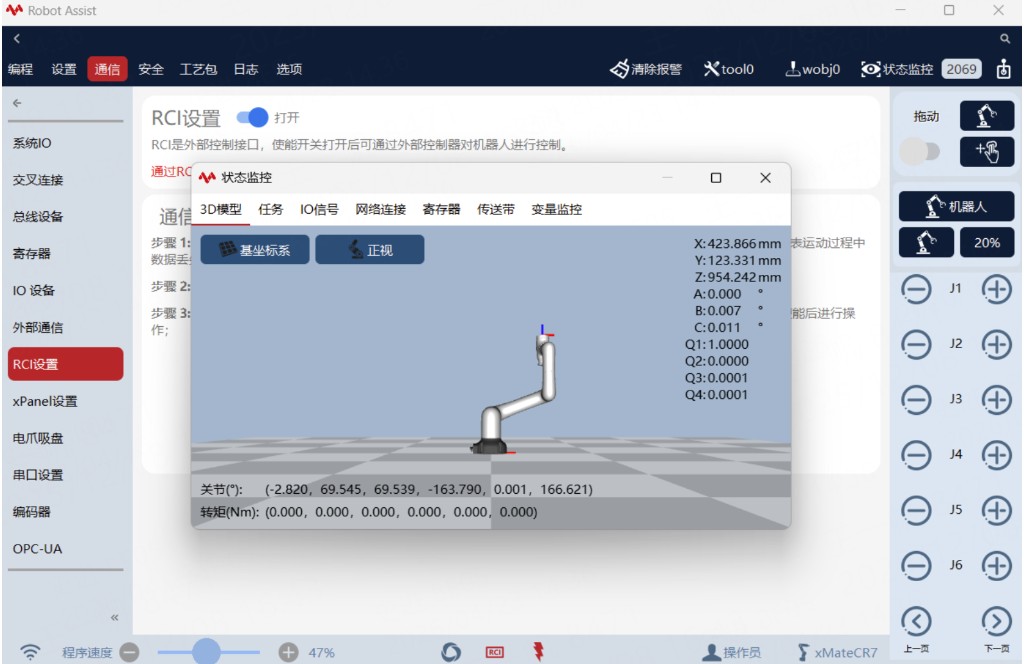
Figure 1 HMI Status Monitor
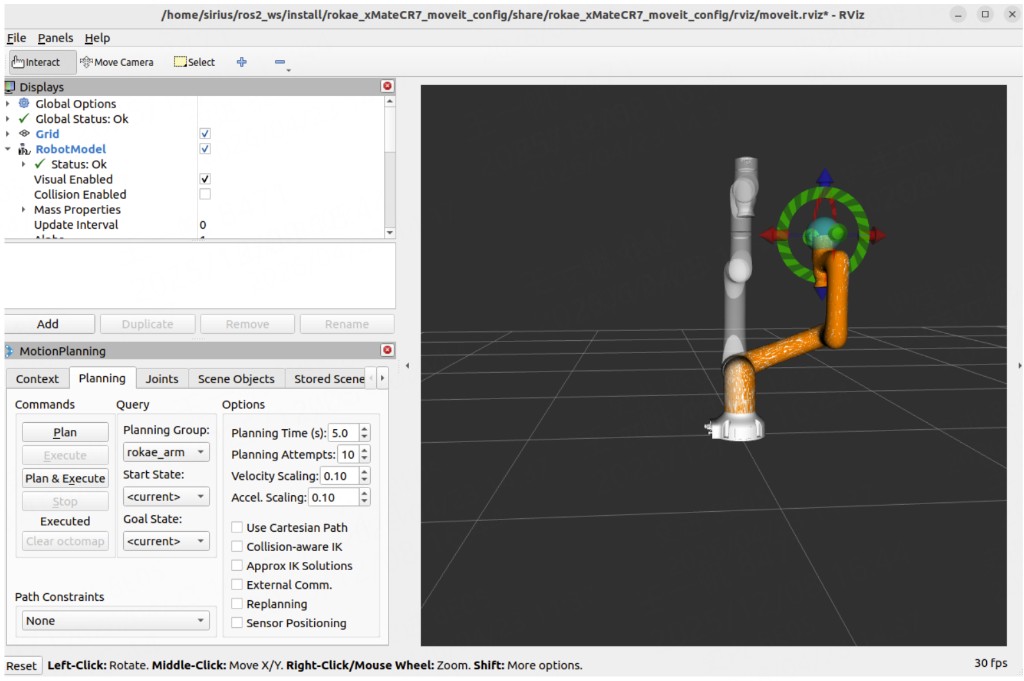
Figure 2 RViz Visualization
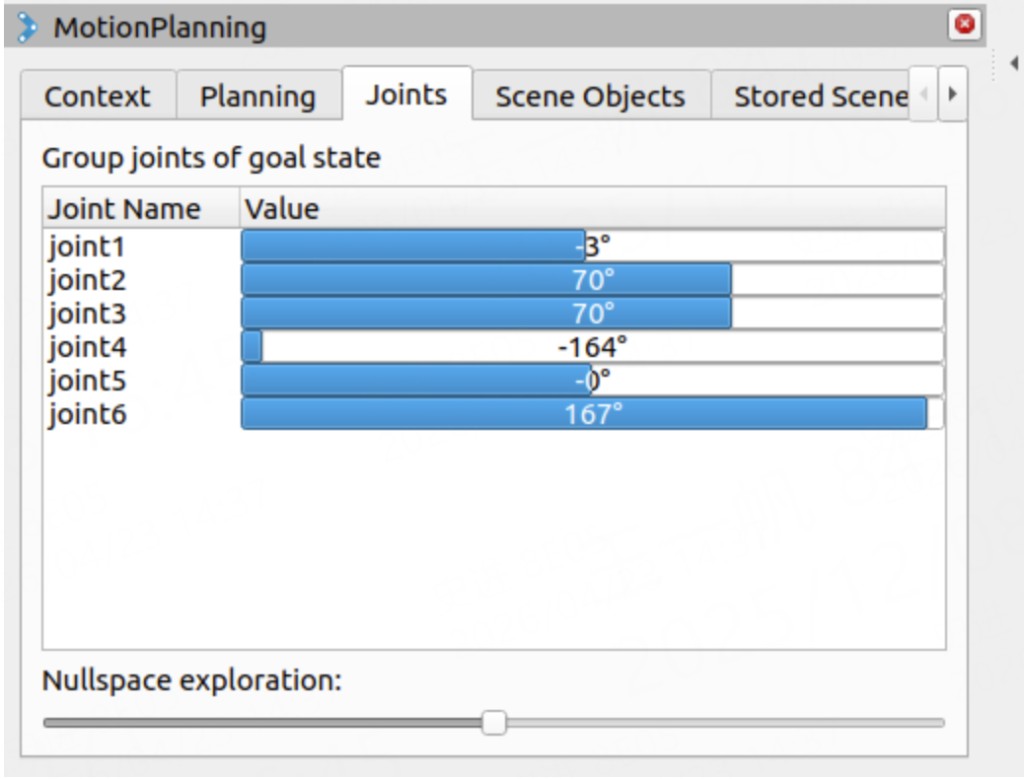
Figure 3 Set target via MotionPlanning -> Joints
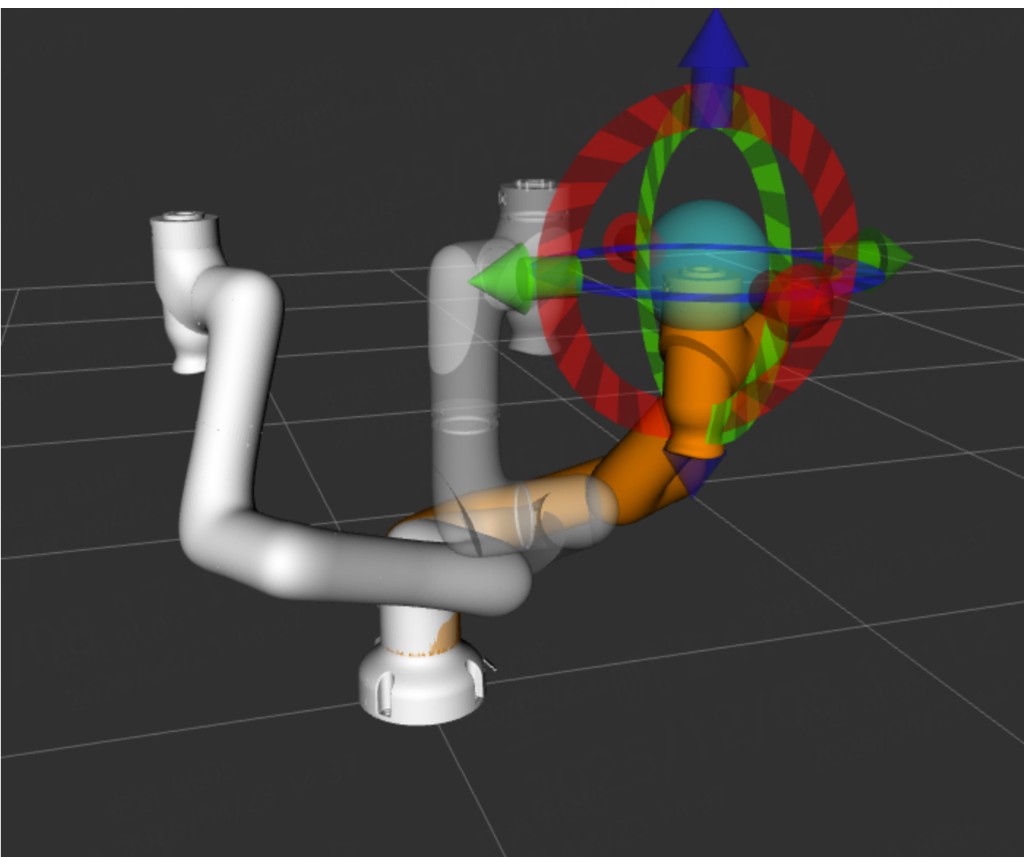
Figure 4 RViz target pose and current pose
4.4 MoveIt-based movej Example
ros2 launch rokae_hardware controll_movej.launch.py robot_type:=SR4
Key points in movej_moveit_test.cpp:
/* ~line 149: pose reference frame must match SRDF base */
arm.setPoseReferenceFrame("AR5-5_07R-W4C4A2_base");

/* ~line 158: joint vector DOF must match */
std::vector<double> joint_target = {0.5, 0.5, 0.5, 0.5, 0.5, 0.5, 0.5};

/* ~line 284: MoveGroup name must match SRDF <group name="..."> */
auto move_group = std::make_shared<moveit::planning_interface::MoveGroupInterface>(node, "AR5R_arm");
// xMate default group name is often rokae_arm
4.5 Common Nodes / Topics / Actions
4.5.1 Nodes
ros2 node list
ros2 node info /<node_name>
| Node | Description |
|---|---|
/controller_manager | ros2_control controller manager |
/joint_state_broadcaster | Publishes hardware joint states to /joint_states |
/joint_state_publisher | Helper when no real hardware interface is present |
/move_group | MoveIt 2 planning core |
/moveit_simple_controller_manager | Bridge between MoveIt and trajectory controllers |
/position_joint_trajectory_controller | Joint trajectory tracking controller |
/robot_state_publisher | Publishes TF from URDF + /joint_states |
/rviz2 | RViz2 visualization |
4.5.2 Topics
ros2 topic list
ros2 topic info /<topic_name>
ros2 topic echo /<topic_name>
| Topic | Description |
|---|---|
/joint_states | Full joint state |
/display_planned_path | Planned path waypoints |
/position_joint_trajectory_controller/controller_state | Controller state |
/position_joint_trajectory_controller/joint_trajectory | Trajectory commands (usually via Action) |
4.5.3 Actions
ros2 action list
ros2 action info /<action_name>
| Action | Description |
|---|---|
/execute_trajectory | Execute a planned trajectory |
/move_action | MoveIt plan and execute |
/position_joint_trajectory_controller/follow_joint_trajectory | Trajectory tracking for MoveIt |
4.6 rokae_driver Interfaces
rokae_driver / rokae_driver7 wrap part of xCore APIs as ROS 2 Services and Topics.
4.6.1 Services
Definitions live in rokae_msgs/srv.
| Service | Description | Type |
|---|---|---|
/rokae_driver/get_robot_info | Model / SDK version | GetRobotInfo |
/rokae_driver/jog_control | Jog | JogCon |
/rokae_driver/drag_control | Drag teaching on/off | DragCon |
/rokae_driver/calculate_fk | Forward kinematics | CalculateFK |
/rokae_driver/calculate_ik | Inverse kinematics | CalculateIK |
/rokae_driver/get_di / set_di | Digital inputs | GetDI / SetDI |
/rokae_driver/get_do / set_do | Digital outputs | GetDO / SetDO |
/rokae_driver/movej | MoveJ | MoveJ |
/rokae_driver/movel | MoveL | MoveL |
/rokae_driver/movec | MoveC | MoveC |
/rokae_driver/read_register / write_register | Register R/W | ReadRegister / WriteRegister |
Seven-axis binary is
rokae_driver7; namespace is typically/rokae_driver7/...(see launch).
4.6.2 Topics
| Topic | Description | Type |
|---|---|---|
/rokae_driver/joint_states | Joint angles | sensor_msgs/msg/JointState |
/rokae_driver/cartesian_pose | Cartesian pose (flange frame in implementation) | geometry_msgs/msg/PoseStamped |
4.6.3 Startup
ros2 run rokae_hardware rokae_driver --ros-args -p robot_ip:=192.168.2.160 -p local_ip:=192.168.2.100

ros2 launch rokae_hardware rokae_driver.launch.py robot_ip:=192.168.2.160 local_ip:=192.168.2.100

# Industrial models
ros2 launch rokae_hardware rokae_driver.launch.py robot_ip:=192.168.21.10 local_ip:=192.168.21.101 robot_class:=standard xMate_type:=XB7s

ros2 launch rokae_hardware rokae_driver.launch.py robot_ip:=192.168.21.10 local_ip:=192.168.21.101 robot_class:=standard xMate_type:=XB7h
Use either run or launch. Replace IPs as needed. For industrial models, change xMate_type to the matching model ID.
ros2 service call /rokae_driver/get_robot_info rokae_msgs/srv/GetRobotInfo
Chapter 5 Extension and Customization
5.1 Adapt New Robot Models
- Add new URDF / xacro, meshes, and collision models in
rokae_description. - Update
rokae_description/urdf/xMate.urdf.xacroandxMate_macro.xacro; add corresponding*.ros2_control.xacro. - Use MoveIt Setup Assistant to generate the new model's
*_moveit_configpackage and align file organization with existing model packages.
Chapter 6 Gazebo Simulation and Trajectory Development
Notes
- Examples use workspace
~/ros2_wsand source tree~/ros2_ws/src/rokae_ros2; replace with your paths. In every new terminal:
source ~/ros2_ws/install/setup.bash - Joint names are unified as
joint1–joint6(6-axis) orjoint1–joint7(7-axis). Soft limits come from the matching URDF / Gazebo xacro<limit>. Always checkros2 topic echo /joint_statesbefore publishing trajectories.
6.1 Environment and Scenes
6.1.1 One-click obstacle world
With gazebo_world_file:=obstacles.world, test_model.launch.py loads rokae_gazebo/worlds/obstacles.world. Models and worlds are decoupled—only change robot_type.
source ~/ros2_ws/install/setup.bash
ros2 launch rokae_hardware test_model.launch.py \
  robot_type:=Pro3 gazebo_world_file:=obstacles.world gui:=true
Supported models include SR3/SR4/SR5, CR7/CR12/CR18/CR20/CR35, ER3/ER7, Pro3/Pro7, AR5L/AR5R/AR5R08/AR5L08/AR3R/AR3L, and industrial types such as NB12s. Default empty world is empty.world.
6.1.2 Scene load / save services
Node scene_service (rokae_hardware) provides:
| Service | Purpose |
|---|---|
/load_scene | Resolve a .world by name and register it as a parameter |
/save_scene | Copy a template world into a user snapshot |
Type: rokae_hardware/srv/SceneService, field scene_name.
# Terminal 1
ros2 launch rokae_hardware test_model.launch.py \
  robot_type:=SR3 gazebo_world_file:=obstacles.world gui:=true

# Terminal 2
ros2 run rokae_hardware scene_service

# Terminal 3
ros2 service call /load_scene rokae_hardware/srv/SceneService "{scene_name: 'obstacles.world'}"
ros2 service call /save_scene rokae_hardware/srv/SceneService "{scene_name: 'my_cr7_snapshot'}"
Snapshots are typically saved under ~/.rokae_gazebo/saved_worlds/<name>.world. To replace a running Gazebo world, stop Gazebo and relaunch with the desired world file.
6.1.3 Collision detection
# Terminal 1
ros2 launch rokae_hardware test_model.launch.py \
  robot_type:=SR5 gazebo_world_file:=obstacles.world gui:=true

# Terminal 2 (same robot_type)
ros2 launch rokae_gazebo collision_test.launch.py \
  robot_type:=SR5 publish_motion:=false contact_topic:=/obstacle/bumper_contact
publish_motion:=false: do not auto-publish trajectories; use GUI sliders or external pubs.- Default filter:
robot_collision_substring:=xMate.
6.2 ros2_control Integration and Trajectory Control
6.2.1 Simulation control loop
- Gazebo plugin
libgazebo_ros2_control.sostartscontroller_manager. test_model.launch.pylater spawns:joint_state_broadcaster→/joint_statesarm_controller(JointTrajectoryController) →/arm_controller/joint_trajectory
- Path: ROS 2 trajectory topic → trajectory controller → Gazebo joints.
6.2.2 controll_movej.launch.py
Loads model URDF, gazebo_ros2_control, broadcaster, and arm_controller; can also bring MoveIt and an optional movej demo.
Important: do not set both
enable_gui:=trueandenable_movej:=true.
# Mode A — GUI sliders
ros2 launch rokae_hardware controll_movej.launch.py \
  robot_type:=SR3 enable_gui:=true enable_movej:=false

# Mode B — movej demo + terminal trajectory
ros2 launch rokae_hardware controll_movej.launch.py \
  robot_type:=SR3 enable_gui:=false enable_movej:=true
6.2.3 Verify /joint_states
ros2 topic echo /joint_states --once
name should be joint1…joint6 (or include joint7), matching rokae_hardware/config/xMate{model}_controllers.yaml.
6.2.4 Trajectory topic and ros2 topic pub
ros2 control list_controllers
ros2 topic list | grep joint_trajectory
- Gazebo
test_model/controll_movej: usually/arm_controller/joint_trajectory. - If only
position_joint_trajectory_controlleris active (e.g.rokae_moveit_launch.py): publish to/position_joint_trajectory_controller/joint_trajectory.
6-axis example:
ros2 topic pub --once /arm_controller/joint_trajectory trajectory_msgs/msg/JointTrajectory "
joint_names: [joint1, joint2, joint3, joint4, joint5, joint6]
points:
  - positions: [0.20, -0.20, 0.15, 0.00, 0.20, 0.00]
    time_from_start: {sec: 3, nanosec: 0}
  - positions: [0.20, -0.55, 0.25, 0.10, 0.30, 0.10]
    time_from_start: {sec: 6, nanosec: 0}
"
For 7-axis, both joint_names and each positions must be 7-dimensional.
6.2.5 Soft joint-limit reference (rad)
Values come from Gazebo xacro <limit> entries in the repository; treat as a quick check only. After URDF changes, follow the files.
| Model | joint1 | joint2 | joint3 | joint4 | joint5 | joint6 | joint7 |
|---|---|---|---|---|---|---|---|
| SR3 | [-3.0543, 3.0543] | [-2.3562, 2.2689] | [-3.0543, 2.3562] | [-3.0543, 3.0543] | [-3.0543, 3.0543] | [-3.0543, 3.0543] | — |
| SR4 | [-3.0543, 3.0543] | [-2.3562, 2.3562] | [-2.3562, 2.3562] | [-3.0543, 3.0543] | [-3.0543, 3.0543] | [-3.0543, 3.0543] | — |
| SR5 | [-6.2832, 6.2832] | [-2.7925, 2.618] | [-2.9671, 2.4435] | [-6.2832, 6.2832] | [-6.2832, 6.2832] | [-6.2832, 6.2832] | — |
| CR7 | [-3.0543, 3.0543] | [-3.0543, 3.0543] | [-3.0543, 3.0543] | [-3.0543, 3.0543] | [-3.0543, 3.0543] | [-3.0543, 3.0543] | — |
| CR12 | [-6.2832, 6.2832] | [-2.9671, 2.9671] | [-6.2832, 6.2832] | [-6.2832, 6.2832] | [-6.2832, 6.2832] | [-6.2832, 6.2832] | — |
| CR18 | [-3.0543, 3.0543] | [-2.9671, 2.9671] | [-2.8798, 2.8798] | [-3.0543, 3.0543] | [-3.0543, 3.0543] | [-3.0543, 3.0543] | — |
| CR20 | [-3.0543, 3.0543] | [-3.0543, 3.0543] | [-2.9671, 2.9671] | [-3.0543, 3.0543] | [-3.0543, 3.0543] | [-3.0543, 3.0543] | — |
| CR35 | [-6.2832, 6.2832] | [-6.2832, 6.2832] | [-2.8972, 2.8972] | [-6.2832, 6.2832] | [-6.2832, 6.2832] | [-6.2832, 6.2832] | — |
| ER3 | [-2.9671, 2.9671] | [-2.0944, 2.0944] | [-2.0944, 2.0944] | [-2.9671, 2.9671] | [-2.0944, 2.0944] | [-6.2832, 6.2832] | — |
| ER7 | [-2.9671, 2.9671] | [-2.0944, 2.0944] | [-2.0944, 2.0944] | [-2.9671, 2.9671] | [-2.0944, 2.0944] | [-6.2832, 6.2832] | — |
| Pro3 / Pro7 | [-2.9671, 2.9671] | [-2.0944, 2.0944] | [-2.9671, 2.9671] | [-2.0944, 2.0944] | [-2.9671, 2.9671] | [-2.0944, 2.0944] | [-6.2832, 6.2832] |
| AR5L / AR5R | [-3.1067, 3.1067] | [-2.0944, 2.0944] | [-3.1067, 3.1067] | [-1.0472, 2.5307] | [-3.1067, 3.1067] | [-1.0472, 1.0472] | [-1.0472, 1.0472] |
| AR5R08 | [-3.1067, 3.1067] | [-2.0944, 2.0944] | [-3.1067, 3.1067] | [-1.0472, 2.5307] | [-3.1067, 3.1067] | [-0.8727, 0.8727] | [-0.8727, 0.8727] |
| AR5R08ZY2 | [-3.1067, 3.1067] | [-2.0944, 2.0944] | [-3.1067, 3.1067] | [-1.0472, 2.5307] | [-3.1067, 3.1067] | [-1.0472, 1.0472] | [-1.0472, 1.0472] |
| AR5L08 | [-3.1067, 3.1067] | [-2.0944, 2.0944] | [-3.1067, 3.1067] | [-1.0472, 2.5307] | [-3.1067, 3.1067] | [-0.8727, 0.8727] | [-0.8727, 0.8727] |
| AR5L08ZY2 | [-3.1067, 3.1067] | [-2.0944, 2.0944] | [-3.1067, 3.1067] | [-1.0472, 2.5307] | [-3.1067, 3.1067] | [-1.0472, 1.0472] | [-1.0472, 1.0472] |
| AR3R | [-3.1067, 3.1067] | [-2.0944, 2.0944] | [-3.1067, 3.1067] | [-1.0472, 2.5307] | [-3.1067, 3.1067] | [-1.0472, 1.0472] | [-1.5708, 1.5708] |
| AR3L | [-3.1067, 3.1067] | [-2.0944, 2.0944] | [-3.1067, 3.1067] | [-1.0472, 2.5307] | [-3.1067, 3.1067] | [-1.0472, 1.0472] | [-1.5708, 1.5708] |
| XB7s / XB7h | [-2.9671, 2.9671] | [-1.6755, 2.3562] | [-3.4034, 1.1345] | [-2.9671, 2.9671] | [-2.0944, 2.0944] | [-6.2832, 6.2832] | — |
| NB25s | [-3.1416, 3.1416] | [-1.7279, 2.7227] | [-3.4907, 1.3090] | [-3.1416, 3.1416] | [-2.3562, 2.3562] | [-6.2832, 6.2832] | — |
| NB25h | [-3.1416, 3.1416] | [-1.7279, 2.7227] | [-3.4907, 1.3090] | [-3.7525, 3.7525] | [-3.9270, 3.9270] | [-7.8540, 7.8540] | — |
| NB12s | [-2.9671, 2.9671] | [-1.8326, 2.5307] | [-3.6652, 1.2217] | [-4.7124, 4.7124] | [-2.3562, 2.3562] | [-6.2832, 6.2832] | — |
| NB12h | [-3.1416, 3.1416] | [-1.7453, 2.6180] | [-3.4907, 1.5708] | [-3.1416, 3.1416] | [-3.1416, 3.1416] | [-6.2832, 6.2832] | — |
| EB4 / XB4s / XB4h | [-2.9671, 2.9671] | [-1.3963, 2.5133] | [-3.3859, 0.9425] | [-2.9671, 2.9671] | [-2.0769, 2.0769] | [-6.2832, 6.2832] | — |
| NB4 | [-2.9671, 2.9671] | [-1.5708, 2.2689] | [-3.4907, 0.9599] | [-2.9671, 2.9671] | [-2.0944, 2.0944] | [-6.2832, 6.2832] | — |
| NB220s | [-3.2289, 3.2289] | [-1.1345, 1.4835] | [-3.5779, 1.3963] | [-3.4907, 3.4907] | [-2.2689, 2.2689] | [-6.2832, 6.2832] | — |
6.3 One-click Launch (Sim / Real)
6.3.1 Entry and internal chain
ros2 launch rokae_hardware gazebo_moveit.launch.py ...
| Condition | Sub-launch | Role |
|---|---|---|
mode:=sim | controll_movej.launch.py | Gazebo + gazebo_ros2_control; world → gazebo_world_file; optional enable_gui / enable_movej |
mode:=real | real_moveit.launch.py | Host ros2_control_node + real IPs; loads xMate{model}_real_controllers.yaml; no Gazebo |
6.3.2 Parameter constraints
mode:=realrequiresuse_sim_time:=false.- In
mode:=sim, do not enable bothenable_guiandenable_movej. mode:=realrequires bothrobot_ipandlocal_ip.
6.3.3 Simulation examples
# Empty world + GUI sliders (SR3)
ros2 launch rokae_hardware gazebo_moveit.launch.py \
  mode:=sim robot_type:=SR3 world:=empty.world enable_gui:=true enable_movej:=false

# Obstacle world (CR7 / CR35)
ros2 launch rokae_hardware gazebo_moveit.launch.py \
  mode:=sim robot_type:=CR7 world:=obstacles.world enable_gui:=true enable_movej:=false
ros2 launch rokae_hardware gazebo_moveit.launch.py \
  mode:=sim robot_type:=CR35 world:=obstacles.world enable_gui:=true enable_movej:=false

# Industrial NB12s / NB12h / NB25s / NB25h / NB220s
ros2 launch rokae_hardware test_model.launch.py robot_type:=NB12s gazebo_world_file:=empty.world gui:=true
ros2 launch rokae_hardware gazebo_moveit.launch.py \
  mode:=sim robot_type:=NB12s world:=empty.world enable_gui:=true enable_movej:=false
ros2 launch rokae_hardware test_model.launch.py robot_type:=NB220s gazebo_world_file:=empty.world gui:=true
ros2 launch rokae_hardware gazebo_moveit.launch.py \
  mode:=sim robot_type:=NB220s world:=empty.world enable_gui:=true enable_movej:=false

# movej demo without GUI
ros2 launch rokae_hardware gazebo_moveit.launch.py \
  mode:=sim robot_type:=CR7 world:=empty.world enable_gui:=false enable_movej:=true

# 7-axis AR series (AR5L08 / AR5R08 / AR5R08ZY2 / AR5L08ZY2 / AR3L / AR3R)
ros2 launch rokae_hardware test_model.launch.py robot_type:=AR5L08 gazebo_world_file:=empty.world gui:=false
ros2 launch rokae_hardware gazebo_moveit.launch.py \
  mode:=sim robot_type:=AR5L08 world:=empty.world enable_gui:=true enable_movej:=false
ros2 launch rokae_hardware gazebo_moveit.launch.py \
  mode:=sim robot_type:=AR5R08ZY2 world:=empty.world enable_gui:=true enable_movej:=false
ros2 launch rokae_hardware gazebo_moveit.launch.py \
  mode:=sim robot_type:=AR3L world:=empty.world enable_gui:=true enable_movej:=false
6.3.4 Real-robot examples
# CR7 / CR35 real robot (no Gazebo)
ros2 launch rokae_hardware gazebo_moveit.launch.py \
  mode:=real robot_type:=CR7 \
  robot_ip:=192.168.2.160 local_ip:=192.168.2.162 \
  enable_moveit:=false use_sim_time:=false

# Industrial XB7h (MoveIt + ros2_control together)
ros2 launch rokae_hardware rokae_moveit_launch.py \
  robot_type:=XB7h use_fake_hardware:=false \
  robot_ip:=192.168.21.10 local_ip:=192.168.21.101
Publish a 6-axis trajectory when arm_controller is active:
ros2 topic pub --once /arm_controller/joint_trajectory trajectory_msgs/msg/JointTrajectory "
joint_names: [joint1, joint2, joint3, joint4, joint5, joint6]
points:
  - positions: [0.10, -0.20, 0.15, 0.00, 0.20, 0.00]
    time_from_start: {sec: 3, nanosec: 0}
  - positions: [0.20, -0.35, 0.25, 0.10, 0.30, 0.10]
    time_from_start: {sec: 6, nanosec: 0}
"
6.4 Simulation Recording and Playback
6.4.1 Scripts
rokae_hardware/scripts/record_sim.sh
Usage:bash .../record_sim.sh [bag_dir] [robot_type_optional]
Defaults under~/rosbags/<robot_lower>_sim_<timestamp>; waits for trajectory topics beforeros2 bag record.rokae_hardware/scripts/replay_sim.sh
Usage:bash .../replay_sim.sh <bag_dir> [rate] [with_clock true|false]
Defaultrate=1.0; third argtrueaddsros2 bag play --clock.
6.4.2 Recommended three-terminal flow
Example: robot_type:=CR7, bag ~/rosbags/cr7_sim0002.
# Terminal 1 — start sim
ros2 launch rokae_hardware gazebo_moveit.launch.py \
  mode:=sim robot_type:=CR7 world:=empty.world enable_gui:=false enable_movej:=false

# Terminal 2 — record
bash ~/ros2_ws/src/rokae_ros2/rokae_hardware/scripts/record_sim.sh ~/rosbags/cr7_sim0002 CR7
# Stop with Ctrl+C

# Terminal 3 — publish trajectory while recording
ros2 topic pub --once /arm_controller/joint_trajectory trajectory_msgs/msg/JointTrajectory "
joint_names: [joint1, joint2, joint3, joint4, joint5, joint6]
points:
  - positions: [0.10, -0.20, 0.15, 0.00, 0.20, 0.00]
    time_from_start: {sec: 3, nanosec: 0}
  - positions: [0.30, -0.35, 0.25, 0.10, 0.30, 0.10]
    time_from_start: {sec: 6, nanosec: 0}
"
6.4.3 Inspect and replay
ros2 bag info ~/rosbags/cr7_sim0002

# Restart the same sim first, then:
bash ~/ros2_ws/src/rokae_ros2/rokae_hardware/scripts/replay_sim.sh ~/rosbags/cr7_sim0002
bash ~/ros2_ws/src/rokae_ros2/rokae_hardware/scripts/replay_sim.sh ~/rosbags/cr7_sim0002 2.0
bash ~/ros2_ws/src/rokae_ros2/rokae_hardware/scripts/replay_sim.sh ~/rosbags/cr7_sim0002 1.0 true
6.4.4 Notes
- Replay requires the same
robot_type, URDF, and DOF as recording. - Confirm the trajectory controller is active with
ros2 control list_controllers. - On anomalies, check
use_sim_time, whether the bag contains/clock, and the third argument ofreplay_sim.sh.
Appendix A Glossary
| Term | Description |
|---|---|
robot_type | Model shorthand in launch files; selects URDF, controller YAML, MoveIt config package |
use_fake_hardware | Whether to use simulation GenericSystem plugin |
robot_class / xMate_type | Industrial rokae_driver / hardware params; standard + model ID selects StandardRobot |
flangeInBase | SDK coordinate type: flange relative to base frame |
endInRef | SDK coordinate type: tool/end-effector relative to reference frame |
Appendix B Feedback and Support
If document content differs from code behavior, always refer to the latest repository version.
When reporting issues, include: ROS 2 distribution, Ubuntu version, robot model, robot_type, full launch command, and terminal logs.